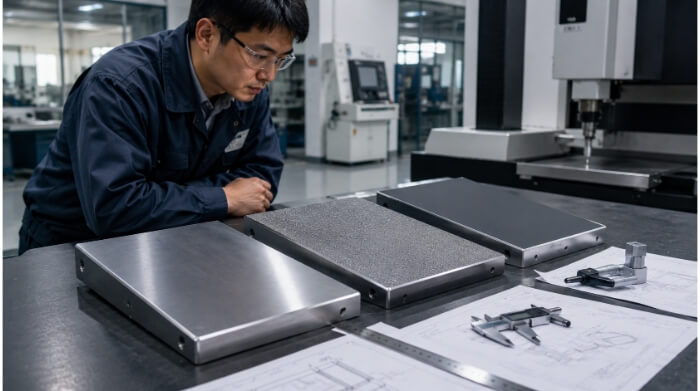
En el software CAD, añadir un redondeo es tan fácil como seleccionar una arista y teclear un número. En el taller, ese mismo clic puede duplicar el tiempo de mecanizado, obligar a utilizar microherramientas frágiles y disparar el coste de la pieza.
Los filetes -las transiciones redondeadas entre dos superficies- son un elemento fundamental en el diseño mecánico. Evitan que las piezas se agrieten bajo presión y facilitan la fabricación. Sin embargo, existe una enorme brecha entre un radio que se ve bien en una pantalla y uno que se mecaniza eficientemente en una fresadora CNC.
En esta guía se prescinde de la teoría académica y se explica con exactitud cómo influyen las decisiones sobre los radios en la máquina, el operario y el resultado final.
Dónde ayudan los filetes en las piezas mecanizadas?
Antes de reducir costes, es importante comprender qué aporta realmente un filete a su pieza. No están ahí sólo para suavizar el aspecto de un diseño; son características de ingeniería altamente funcionales.
Tensión en las esquinas interiores
Las esquinas internas afiladas son imanes de tensión en el diseño mecánico. Cuando una pieza se somete a una carga, ya sea de torsión, peso o vibración cíclica, las fuerzas mecánicas se concentran directamente en estas intersecciones afiladas. Una esquina perfectamente afilada puede aumentar la tensión local en un factor de 3 o más (el Factor de Concentración de Tensión, Kt), creando un punto de partida privilegiado para las grietas microscópicas.
Añadir un filete suaviza la geometría, permitiendo que la tensión fluya y se distribuya sobre una superficie mucho mayor. Este sencillo cambio de diseño mejora drásticamente la capacidad de carga de la pieza y su resistencia a la fatiga a largo plazo.
Regla de diseño: Utilice un radio de redondeo mínimo de 0,015″ a 0,030″ (0,4 mm a 0,8 mm) en cualquier esquina interna de carga. Incluso un microbisel proporciona una resistencia a la fatiga exponencialmente mejor que un borde afilado.
Bordes que necesitan resistencia o un manejo más seguro
Los bordes exteriores sufren mucho en el mundo real. Una esquina exterior afilada de 90 grados es muy propensa a astillarse, abollarse o deformarse durante el transporte, el montaje o el funcionamiento normal.
La aplicación de un filete convexo reduce este borde vulnerable, mejorando instantáneamente la durabilidad del componente. Y lo que es igual de importante, elimina las rebabas afiladas, lo que hace que la manipulación de la pieza sea mucho más segura para los operarios, los usuarios finales y los técnicos de montaje.
Radios que afectan a la función
A veces, una superficie curva es estrictamente innegociable para que la pieza funcione correctamente. Esto es especialmente cierto en el caso de las transiciones internas necesarias para la dinámica de fluidos en colectores o cuerpos de válvulas, donde las esquinas afiladas provocarían graves turbulencias en el flujo o costosas caídas de presión.
Esto también se aplica a los requisitos ergonómicos, como las empuñaduras de los dispositivos médicos. Además, es posible que se requieran radios geométricos específicos para encajar o acoplar perfectamente dos piezas en un ensamblaje complejo de tolerancias estrictas.
Radios añadidos sólo por apariencia
Los redondeos cosméticos se utilizan exclusivamente para que una pieza parezca de primera calidad, elegante y visualmente acabada. Si un radio no mejora la integridad estructural, la seguridad o la función mecánica de la pieza, es puramente cosmético.
Aunque sin duda añaden valor estético a los productos destinados al consumidor, los filetes cosméticos deben aplicarse con precaución. Aunque sean "sólo estéticos", consumen tiempo real de máquina, requieren utillaje específico y aumentan la factura final.
Regla de diseño: Si un filete es estrictamente cosmético, afloje su tolerancia en el plano de ingeniería (por ejemplo, ±0,010″ en lugar de ±0,002″). De este modo, el operario puede trabajar con la herramienta más rápidamente sin tener que preocuparse de descartar la pieza por una desviación visual menor.
Por qué salen caros los filetes internos apretados?
La forma más rápida de aumentar el coste de una pieza mecanizada por CNC es diseñar esquinas internas estrechas y profundas. Comprender las limitaciones físicas de las herramientas de corte es la clave absoluta del diseño para la fabricación (DFM).
La cortadora fija el radio mínimo
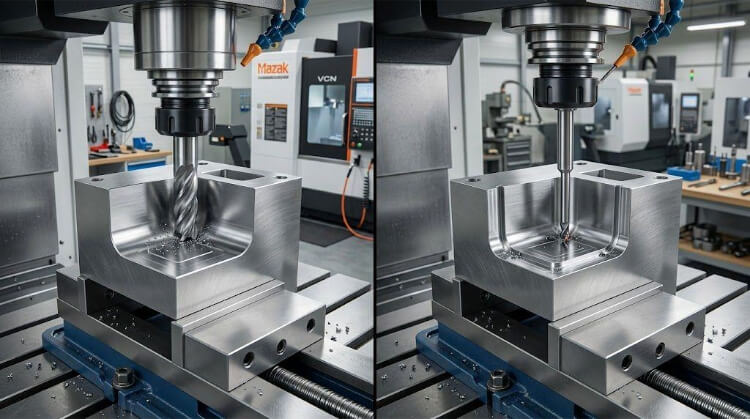
Las fresadoras CNC eliminan material mediante herramientas de corte cilíndricas y giratorias denominadas fresas de mango. Dado que la propia herramienta es perfectamente redonda, físicamente no puede cortar una esquina interna de 90 grados verdadera y afilada. El radio interno mínimo absoluto de una cavidad o ranura viene dictado estrictamente por el radio de la fresa utilizada.
Si se diseña una esquina interna de R0,030″, el taller mecánico no puede utilizar sus robustas herramientas estándar de 1/4″. Se ven obligados a utilizar una fresa de punta delicada con un diámetro diminuto de 0,060″ o inferior solo para encajar dentro de esa esquina y despejar el material físicamente.
Regla de diseño: Diseñe siempre radios de esquina internos al menos 0,020″ (0,5 mm) mayores que el radio de la herramienta estándar que espera que utilice el taller. Esto evita que la herramienta se enganche a 90 grados de material simultáneamente, eliminando el chirrido de las esquinas, el desgaste de la herramienta y las vibraciones.
Las bolsas profundas dificultan los radios pequeños
Las herramientas de corte tienen un límite físico estricto en cuanto a la profundidad que pueden alcanzar en relación con su diámetro. Las fresas estándar pierden su rigidez cuando la relación longitud/diámetro (L/D) supera 4:1.
Si se diseña una cajera de 2 pulgadas de profundidad pero se especifica una esquina interna de R0,050″, se está pidiendo a una fresa diminuta que penetre profundamente en un bloque macizo de metal. Esto obliga a una relación L/D extrema de 20:1. Las herramientas estándar no pueden conseguirlo sin romperse, lo que obliga al taller a comprar costosas herramientas especializadas de largo alcance o a utilizar configuraciones de mecanizado muy complejas.
Regla de diseño: Mantenga el radio de redondeo interno (R) estrictamente superior a 1/5 de la profundidad de la cajera (R > Profundidad / 5). Para una cajera de 1 pulgada de profundidad, los radios de las esquinas no deben ser inferiores a 0,200″ para permitir un utillaje rígido de longitud estándar.
El largo alcance aumenta la vibración y el riesgo para la herramienta
Cuando una herramienta de pequeño diámetro se extiende más allá del husillo para alcanzar una esquina profunda, pierde integridad estructural. La herramienta de corte empezará a doblarse ligeramente contra el metal (desviación) y a vibrar rápidamente (castañeteo), dejando un terrible acabado superficial ondulado.
Para evitar que la herramienta se rompa instantáneamente, el programador del CNC no tiene más remedio que intervenir. Las velocidades de avance deben disminuir hasta 80%, y la herramienta debe realizar docenas de pasadas poco profundas en lugar de unas pocas pasadas rápidas y profundas. Este aumento masivo del tiempo de ciclo de la máquina infla directamente sus costes de fabricación.
Los radios no estándar ralentizan el presupuesto y el mecanizado
Los talleres mecánicos basan sus precios y su eficiencia en sus niveles de existencias. Utilizar tamaños de herramienta estándar fraccionales o métricos (por ejemplo, 1/8″, 1/4″, 1/2″ o 3mm, 6mm, 10mm). Si se diseña un radio interno arbitrario de 0,137″, el maquinista no puede simplemente hundir una herramienta estándar de 1/4″ (que crea una esquina R0,125″) en esa cavidad.
En su lugar, tienen que coger una herramienta más pequeña y programarla minuciosamente para barrer la curva con un movimiento circular. Utilizar la interpolación circular para un radio no estándar puede llevar de 3 a 5 veces más tiempo que simplemente cortar la esquina con una fresa estándar.
Regla de diseño: Haga coincidir los tamaños de los filetes con los diámetros estándar de las fresas, más una pequeña holgura. Por ejemplo, si desea que un taller utilice una fresa de 1/4″ (radio 0,125″), diseñe su esquina como R0,140″. La fresa puede entonces barrer suavemente la esquina en un movimiento continuo sin detenerse.
Chaflán, filete, relieve o EDM
A menudo, los diseñadores recurren por defecto a los redondeos en todas las esquinas, pasando por alto tratamientos de bordes más rápidos, baratos o eficaces. Saber cuándo cambiar un redondeo por un chaflán, un corte en relieve o un proceso de mecanizado alternativo es un sello distintivo de la ingeniería de alto nivel. He aquí el marco para tomar esa decisión.

¿Cuándo es mejor un chaflán?
Un chaflán es un corte plano en ángulo (normalmente de 45 grados) que elimina un borde afilado. A diferencia de los filetes exteriores, que requieren una fresa de punta esférica para realizar varias pasadas de contorneado 3D, un chaflán se corta en una sola pasada rapidísima con una fresa de chaflán especializada.
Regla de diseño: Opte por los chaflanes para el acabado de cantos y las entradas de ensamblaje. El cambio de un filete externo estético por un chaflán de 45 grados puede reducir el tiempo de ciclo de acabado de cantos hasta en 80%, a la vez que requiere herramientas menos costosas y más duraderas.
¿Cuándo merece la pena mecanizar más un filete?
Debe proteger con firmeza sus redondeos -y aceptar el mayor coste de mecanizado- cuando se trate de grandes esfuerzos mecánicos o de dinámica de fluidos. Un chaflán no distribuye la tensión estructural tan eficazmente como un radio suave y amplio.
Si una pieza está sometida a fuertes momentos de flexión, ciclos térmicos o flujo de fluidos a alta presión, un chaflán seguirá actuando como un pequeño elevador de tensión. En estos casos, la integridad estructural que proporciona el chaflán merece la pena por el tiempo de mecanizado adicional.
Cuándo el alivio resuelve la esquina de forma más sencilla?
Si intenta introducir un bloque perfectamente cuadrado en una cajera mecanizada, se enfrentará a una paradoja geométrica: la cajera siempre tendrá una esquina interna redondeada dejada por la fresa, lo que impedirá que el bloque cuadrado asiente a ras.
En lugar de especificar un microfiltro imposiblemente pequeño y muy caro para minimizar esta interferencia, debería cambiar la geometría por completo añadiendo un relieve en las esquinas.
Regla de diseño: Si una pieza de acoplamiento tiene una esquina exterior afilada de 90 grados, utilice un alivio de esquina circular (como un hueso de perro) en el bolsillo interno. Recorte la esquina para que el taller pueda utilizar una herramienta estándar rígida de 1/4″ o 1/2″ para despejar rápidamente el material sin causar interferencias.
Cuándo es la electroerosión la opción práctica?
A veces, una esquina interna de 90 grados totalmente afilada es funcionalmente obligatoria, como en los moldes de inyección personalizados, las matrices de extrusión o los soportes aeroespaciales especializados. El fresado CNC estándar no puede conseguirlo físicamente.
En lugar de luchar contra la física de una herramienta de corte giratoria, opte por el mecanizado por descarga eléctrica (EDM). La electroerosión por hilo, o electroerosión por penetración, utiliza un hilo o electrodo cargado eléctricamente para vaporizar el metal, lo que facilita la creación de esquinas internas perfectas de 90 grados o perfiles increíblemente complejos.
Regla de diseño: Trate la electroerosión como un proceso especializado de primera calidad. Es muy preciso pero funciona a una fracción de la velocidad del fresado CNC. Solo especifique una esquina interna afilada si dispone del presupuesto necesario para absorber las velocidades de avance más lentas y los costes horarios más elevados del procesamiento por electroerosión.
Elegir valores de radio para la producción
Cuando se fabrica un único prototipo, un taller de mecanizado tolera las trayectorias de herramienta ineficaces. Para diseñar por volumen, hay que elegir estratégicamente los radios.
Empiece por el trabajo que debe realizar la pieza
Antes de asignar arbitrariamente un radio, defina exactamente qué debe conseguir la esquina. ¿Se trata de una cavidad de paso para un componente de acoplamiento? ¿Se trata de una junta estructural sometida a grandes esfuerzos?
Si un componente de acoplamiento tiene una esquina externa afilada (como un módulo electrónico cuadrado que encaja en un caja de aluminio), no intente reducir a cero el radio de su cajera interna para acomodarla. En su lugar, cambie la geometría.
Regla de diseño: Al acoplar una pieza cuadrada en una cavidad mecanizada, no fuerce nunca un microrradio. Utilice un alivio de esquina (como un rebaje de hueso de perro) colocado fuera de la huella de acoplamiento. De este modo, el taller puede utilizar una fresa grande y rápida de 1/2″ y garantizar un ajuste perfecto.
Adaptar el radio al material y a la geometría
Una herramienta que funciona perfectamente en aluminio 6061 se destruirá en segundos al cortar acero inoxidable 304 o titanio de grado 5 en las mismas condiciones. Los materiales más duros generan fuerzas de corte y calor inmensos, lo que significa que la rigidez de la herramienta es su única defensa contra el fallo catastrófico de la herramienta.
Si su diseño requiere aleaciones duras, no puede permitirse la desviación de la herramienta causada por fresas de pequeño diámetro en esquinas estrechas. Debe abrir sus radios internos para que el taller pueda utilizar herramientas más gruesas y rígidas.
Regla de diseño: Aumente los tamaños mínimos de fileteado interno en 50%-100% cuando realice la transición de un diseño de metales blandos (aluminio/latón) a aleaciones duras (acero inoxidable/titanio/Inconel).
Mantener los valores de los radios coherentes en la medida de lo posible
Cada vez que una máquina CNC se detiene para cambiar una herramienta, añade entre 10 y 20 segundos de "tiempo muerto" al ciclo. Si diseña una pieza con una cavidad de R0,125″, una ranura de R0,200″ y una pared interna de R0,250″, todo en la misma cara, la máquina debe realizar tres cambios de herramienta distintos para despejar esas esquinas.
En una tirada de producción de 1.000 piezas, esos cambios innecesarios de herramientas podrían añadir a la factura entre 10 y 15 horas de tiempo de máquina completamente desperdiciado.
Regla de diseño: Estandarice los radios internos. Consolidar todas las esquinas internas en una sola cara de la pieza a una sola dimensión de radio (por ejemplo, hacerlos todos R0.200″). De este modo, el operario puede eliminar todas las características con una sola herramienta, lo que reduce los tiempos de ciclo.
Cómo afectan los radios pequeños al acabado?
Una pieza no está acabada cuando sale de la máquina CNC. Los tratamientos superficiales, como anodizadogalvanoplastia, recubrimiento en polvoy pasivación-se comportan terriblemente en bordes afilados y esquinas demasiado cerradas.

Acumulación de revestimiento en los bordes exteriores?
En procesos electroquímicos como el cincado, el niquelado o el anodizado de capa dura, la corriente eléctrica se concentra de forma natural en los puntos y bordes afilados (alta densidad de corriente). Esto hace que el revestimiento se acumule de forma desigual, formando una cresta gruesa y quebradiza a lo largo de las esquinas exteriores afiladas.
Este fenómeno, a menudo denominado "efecto hueso de perro" o "nodulación de los bordes", puede alterar las tolerancias críticas y provocar la descamación del revestimiento durante el montaje.
Regla de diseño: Aplique un filete externo mínimo de R0,015″ a R0,030″ (0,4 mm a 0,8 mm) en cualquier borde que vaya a recibir un acabado chapado o anodizado. La curva distribuye uniformemente la corriente eléctrica, garantizando un espesor de revestimiento uniforme.
Problemas de cobertura en esquinas interiores pequeñas?
Las esquinas internas cerradas sufren el problema contrario. En el recubrimiento en polvo, una esquina interna aguda de 90 grados crea un "efecto jaula de Faraday". La carga eléctrica de la esquina repele activamente las partículas de polvo, dejando la esquina profunda desnuda o peligrosamente sub-revestida.
Del mismo modo, en los procesos de revestimiento húmedo, los líquidos viscosos y los ácidos pueden quedar atrapados en rincones estrechos y afilados. Si estos líquidos no se eliminan por completo, se irán filtrando lentamente a lo largo de los días siguientes, provocando una "sangría ácida" que mancha y estropea permanentemente el acabado circundante.
Por qué puede cambiar el aspecto del borde después del acabado?
Si deja un borde perfectamente afilado en su modelo CAD, es probable que el taller de mecanizado lo desbarbe manualmente con herramientas manuales (como limas o ruedas abrasivas) para que sea seguro manejarlo. El desbarbado manual es muy inconsistente; una pieza puede obtener un chaflán grueso, mientras que la siguiente obtiene un borde irregular y ondulado.
Si el borde está en contacto con una superficie muy cosmética, esta incoherencia será muy evidente después de anodizar o pintar la pieza.
Regla de diseño: Nunca deje un borde como "afilado" si es visible en el producto final. Defina explícitamente una rotura de borde de R0,010″ a R0,020″ (filete o chaflán) directamente en el dibujo. Esto obliga a la máquina CNC a cortar el borde perfectamente, eliminando la inconsistencia del acabado manual humano.
Reglas prácticas de fileteado que reducen costes
Para reducir drásticamente los costes de fabricación y los plazos de entrega, no considere los radios como algo secundario, sino como un factor crítico de la trayectoria de la herramienta CNC. Esta es la lista de comprobación definitiva del diseño para la fabricación (DFM) de redondeos.
Utilice el mayor radio interno que permita el diseño
Cuanto mayor sea el radio interno, mayor será la fresa que pueda utilizar el taller. Una fresa más grande es exponencialmente más rígida, lo que permite velocidades de avance mucho mayores y profundidades de corte mayores. Una cavidad mecanizada con una herramienta de 1/2″ se terminará en una fracción del tiempo que se tarda en mecanizar la misma cavidad con una herramienta de 1/8″.
Regla de diseño: Lleve sus radios internos a su máximo funcional absoluto. Si una esquina R0,250″ funciona mecánicamente igual de bien que una esquina R0,125″, especifique siempre R0,250″.
Evite las esquinas internas afiladas a menos que sean necesarias
Dejar una esquina interna completamente afilada (R0,000″) en un modelo CAD es el error más común y costoso en el dibujo digital. Si el taller recibe un modelo con una esquina interna afilada, su software de presupuestos lo marcará como que requiere herramientas muy especializadas o procesamiento EDM, inflando instantáneamente su presupuesto.
Regla de diseño: Nunca deje una esquina interna afilada a menos que sea mecánicamente vital. Si es necesario que una esquina no quede afilada, asigne un radio estándar generoso para indicar al fabricante que el fresado estándar es aceptable.
Separar los radios críticos de los cosméticos
Si se aplica una tolerancia general de ±0,005″ a todo el plano, se obliga al operario a detener constantemente la máquina, inspeccionar la pieza y medir las roturas estéticas de los bordes con calibres de alta precisión. Esto ralentiza la producción y aumenta la tasa de piezas desechadas que no pasan la inspección por razones puramente visuales.
Regla de diseño: Separe explícitamente los radios funcionales críticos de los estéticos en sus dibujos 2D. Utilice una nota en el bloque de título que diga: "TODOS LOS RADIOS COSMÉTICOS NO TOLERADOS DEBEN SER R0,015″ ±0,010". Esto da al taller la libertad de trabajar rápido sin comprometer sus dimensiones críticas.
Utilizar tamaños de herramientas estándar siempre que sea posible
Los talleres de mecanizado utilizan fresas estándar fraccionales o métricas. Si se diseña una esquina con un radio exacto de una herramienta estándar (por ejemplo, una esquina R0,125″ para una fresa de 1/4″), la herramienta chirriará y castañeará al golpear la esquina porque 90 grados de la fresa engranan simultáneamente con el material.
Regla de diseño: Diseñe siempre los filetes internos para que sean ligeramente mayores que los tamaños de herramienta estándar. Añada un mínimo de 0,020″ (0,5 mm) al radio estándar de la herramienta.
- En lugar de R0,125″ (para una herramienta de 1/4″), utilice R0,145″.
- En lugar de R3,0 mm (para una herramienta de 6 mm), utilice R3,5 mm.
Esto permite a la herramienta barrer fácilmente la esquina mediante interpolación circular, dejando un acabado superficial perfecto y evitando la rotura de la herramienta.
Conclusión
El mecanizado de filetes parece sencillo en un plano, pero puede cambiar el coste, la dificultad de mecanizado y la calidad final de la pieza de una forma muy real. Un radio que mejora la resistencia en una zona puede crear problemas de acceso a la herramienta, tiempos de ciclo más largos o riesgos de acabado en otra.
La elección del mejor filete depende del trabajo que deba realizar la pieza. También depende del material, la geometría, el utillaje y el volumen de producción. En muchos casos, un radio mayor y más consistente hace que la pieza sea más fácil de mecanizar y de cotizar.
Si está revisando una pieza mecanizada y no está seguro de si el diseño de filete es práctico, envíenos su dibujo. Podemos revisar los valores de los radios, las esquinas internas, los límites de las herramientas y las necesidades de acabado antes de iniciar la producción.
Hola, soy Kevin Lee

Durante los últimos 10 años, he estado inmerso en diversas formas de fabricación de chapa metálica, compartiendo aquí ideas interesantes de mis experiencias en diversos talleres.
Póngase en contacto
Kevin Lee
Tengo más de diez años de experiencia profesional en la fabricación de chapas metálicas, especializada en corte por láser, plegado, soldadura y técnicas de tratamiento de superficies. Como Director Técnico de Shengen, me comprometo a resolver complejos retos de fabricación y a impulsar la innovación y la calidad en cada proyecto.
Recursos relacionados
Uniones por prensado en chapa: diseño, coste y calidad
Acero 4140 frente a acero 4130: mecanizado, soldadura y selección
Alivios de plegado en chapa: dimensiones, formas y normas de DFM